
"Seven days, so seventy time options to create by hand — it is an enormous amount of work." "I am collecting attendance from about ninety people with Chouseisan, but working out who has not replied is exhausting." Both are real questions posted to Yahoo! Chiebukuro, Japan's largest Q&A site — the first in July 2025, the second in April 2019. Six years apart, and stuck in almost the same place. This article is for anyone about to build their first Chouseisan attendance sheet, and for anyone who built one and then stopped.
Part of the answer up front: almost nobody gets stuck making the sheet. That takes a few minutes. The questions cluster afterwards, and they cluster in three places — the number of candidate times, the people who have not replied, and who can read the answers. Those three are not separate inconveniences. They come from one thing: an attendance sheet has no people in it, only answers typed as text that belong to nobody. We will walk the procedure first, then take the four sticking points one at a time.
Scheduling and booking for one-person businesses and small teams is collected in our resources for solo operators and small teams.
The short answer
You build a Chouseisan attendance sheet by opening the site, typing an event name and the candidate dates, pressing "create", and sharing the URL. No account is required. What trips people up comes later: candidate times are added one at a time, every answer is visible to everyone, and people who have not replied cannot be counted. None of that is a setting you have missed — it follows from the sheet having no individuals in it. For a drinks party that is fine. For any group that has a roster, you need a different way of building it.
Contents
How to build the attendance sheet

There are five steps for the organiser. Open the Chouseisan site, enter an event name, optionally add a note, choose the candidate dates, and press the create button. Paste the resulting URL into email or chat and you are done. No sign-up, no login (source: Chouseisan, "The complete guide to making and using Chouseisan", as documented in August 2026, covering Chouseisan's own site).
The note field can be left empty, but putting the reply deadline there changes how much chasing you do later. As covered below, Chouseisan does not notify people who have not answered. A deadline at least lets readers judge for themselves.
You can edit the event afterwards. Open the sheet's URL and use the edit control to remove or reorder candidate dates. Once answers arrive, the date with the most yes marks is highlighted automatically.
What the people answering have to do

Recipients open the URL, press the answer button, type a name, mark each candidate ○ (yes) / △ (if needed) / × (no), add a comment if they want, and submit. No account here either, and no app to install.
Mistakes are easy to fix: reopening the same URL lets someone change their answer. But what they are editing is the row typed under that name — nothing has verified that they are that person. This comes back later in the article.
What △ means is the organiser's decision. It is useful when "I could make it work, but it is not my first choice" is worth knowing, and it blunts the decision when you want a straight answer. The fact that "Chouseisan △ not needed" is a common related search suggests the hesitation is widely shared.
Many candidate times means sharply more work

Here is that first question again: "Because one day (10:00–22:00) holds ten 60-minute slots, seven days means creating seventy options, which is an enormous amount of work." Listing five dates takes seconds. Once you slice the day into times, the count multiplies.
Seven days × ten slots a day = seventy. At ten seconds to enter and check each one, that alone is close to twelve minutes. What grows is not the number of days but the product of days and time slots. It bites soonest exactly where you need times rather than dates — interview slots, lesson availability, a client meeting.
There are two ways around it. Make the candidates coarser: morning or afternoon turns seven days into fourteen options. Or use something that builds the candidates from a date range, a working window and the weekdays you want. The second is not a Chouseisan feature, so it means changing tools.
You cannot see who has not answered

The sheet only contains rows for people who have answered. There is no row for anyone who has not. To produce a list of non-responders you have to hold your own roster against the screen and subtract. At ninety people that is real work, which was the 2019 question.
In March 2026 the same need arrived from the other side: "Entering about forty names in advance is a lot of effort. (Many of them are elderly, so I would like the names there first…)". If the names are there first, a missing answer is visible as an empty cell. The two questions are the same request, seen from either end.
What you can do inside Chouseisan today: put the deadline in the note field, and dictate how names should be written. A single line saying "please use your full name" prevents the duplicate-and-variant mess that makes reconciliation impossible.
Everyone can read everyone's answers

Anyone who opens the URL can read every answer. That is the design, not a defect, but it does cause trouble. "A question about scheduling tools for a work drinks party. With Chouseisan, everyone taking part can see everyone else's availability, can't they?" — May 2026. The same question was asked in 2018 and again in 2022.
Visibility has two side effects. People answer to match whoever went first. And other people's plans — personal information — get shared without anyone deciding to share them. One questioner running an HR study group described participants who waited to see who else was coming before committing.
Anyone holding the URL can also open it. In 2015 someone posted: "There are names in our Chouseisan sheet that I do not recognise at all." However far the URL travels is exactly how far read access travels. If you are pasting it somewhere that can be forwarded, write the candidate dates on that assumption.
| What happens | Cause | What helps today |
|---|---|---|
| Answers drift toward whoever replied first | All answers are readable | Offer fewer candidates, so there is less to weigh |
| Other people's plans get shared | Same | Say what not to put in the comment field |
| Unfamiliar names appear | Anyone with the URL can edit | Only paste it where it will not be forwarded |
All four come from the same design
Line the four up and the common thread appears. In a Chouseisan sheet a name is text typed at answer time. A row belongs to nobody. A row that belongs to nobody cannot be hidden, cannot be counted as missing, and cannot be prepared in advance.
This is a trade, not a flaw. Choose a design that asks nothing of the people answering, and you give up any way of identifying them. The greatest strength — no registration — and the four frustrations grow from the same root.
Creating an account changes the organiser's own possessions, not that root. Chouseisan's own documentation lists event history, editing after clearing browser data, and editing from a different device (source: Chouseisan, "The complete guide to making and using Chouseisan", as documented in August 2026, covering Chouseisan's own site).
| Without an account | With an account | |
|---|---|---|
| Create an attendance sheet | Yes | Yes |
| See your past events in one list | No | Yes |
| Edit after clearing browser data | No | Yes |
| Hide answers / list non-responders | No | No |
The last row is the point. Signing up does not change who can read the answers, or let you count who is missing.
When the group has a roster

Taken together, the choice of tool comes down to something other than preference: whether the group has a roster. With no roster, rows belonging to nobody cost you nothing — a drinks party or a club is exactly that. With a roster — a committee, a parents' association, interviews, a client meeting — all four items above come back as work you do by hand.
For a group with a roster, four things matter. Candidate times built from a range. The ability to register invitees up front. A view of who has not answered. And control over who can read the answers. Below we take SailLab as one example of a tool that covers all four.
SailLab
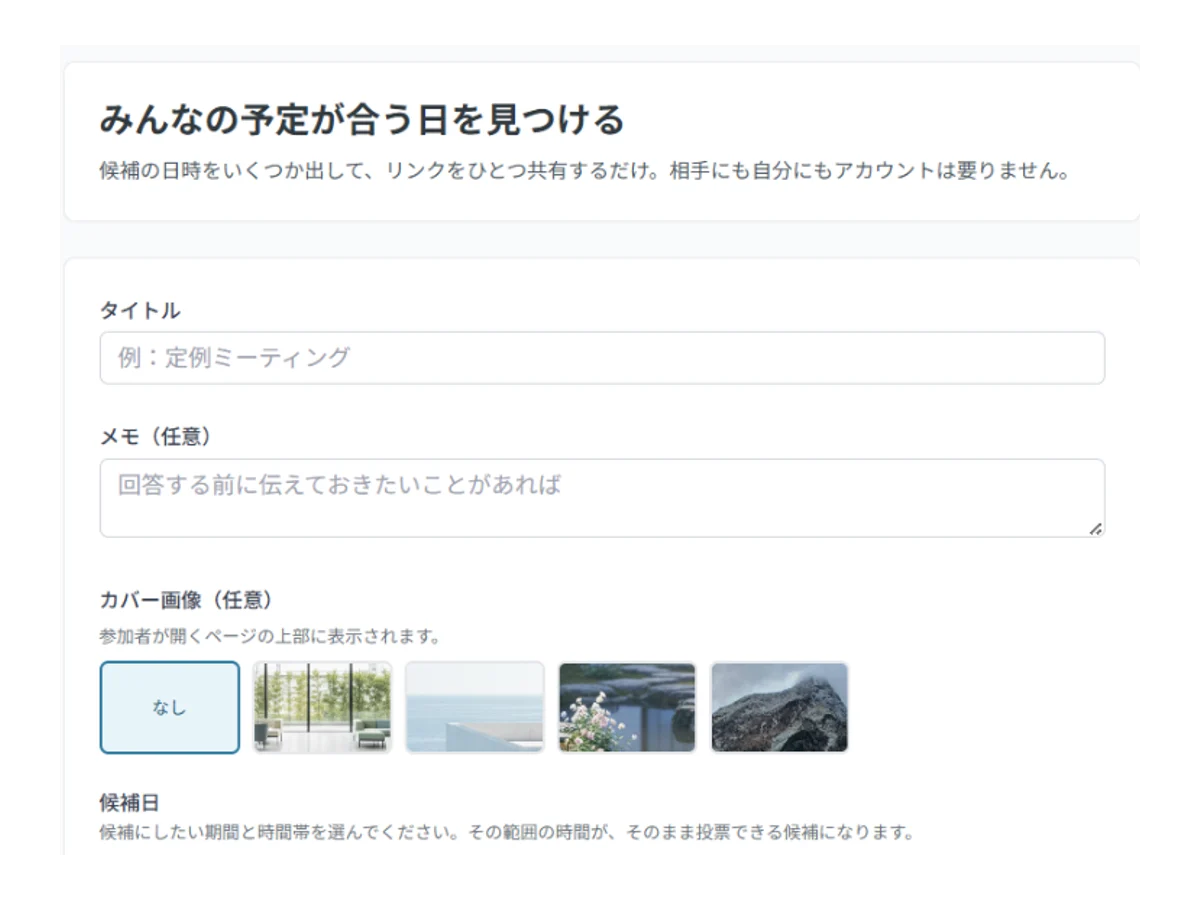
SailLab is a Japanese scheduling tool that puts the candidate-date vote and the booking that follows it in one place. The scheduling half is usable on the free tier.
- Candidates come from a range. Pick a span of dates, a working window and the weekdays; the slots are built for you, up to 120. The seventy from the opening question takes seconds in this shape.
- Email invitations create the rows first. Each person gets their own link with their name already filled in — the roster goes in up front.
- Non-responders are listed. Invitees exist as rows before they answer, so the gap is visible.
- Other people's answers can be hidden. Respondents see only their own row; the host sees everything.
- Answering still needs no account. Open the link, mark ○ / △ / ×, and change it later from the same link.
You can also try it without an account at all. The no-signup scheduling poll lets you build candidate times and share a link straight away. In that form, though, there are no email invitations, no hidden answers, and no way to settle the date — each of those needs an account that can identify a person. Up to 5 people can answer, and the poll is kept for a year. Choosing "make it private" later moves it into an account, keeping the same URL and every answer already given.
| Plan | Monthly (excl. tax) | People per poll |
|---|---|---|
| No account | ¥0 | 5 |
| Free | ¥0 | 10 |
| Light | ¥1,000 (¥800 on an annual contract) | No limit |
| Standard | ¥1,500 (¥1,200 on an annual contract) | No limit |
Prices are as of August 2026; the current details are on the pricing page. It suits people who run the same rostered group again and again.
In closing: decide by whether there is a roster
A Chouseisan sheet takes minutes to build and asks nothing of the people answering. That convenience and the four sticking points in this article are two sides of one design.
| Occasion | Roster | Is an attendance sheet enough? |
|---|---|---|
| Drinks, clubs, reunions | No | Yes — this is where no-registration wins |
| Parents' associations, committees | Yes | Tracking non-responders becomes manual |
| Interviews | Yes | No — candidates would see each other's answers |
| Client meetings | Yes | Building time-level candidates is heavy |
In order, three steps:
- Decide whether this group has a roster. If it does not, build the sheet in Chouseisan and share it.
- If it does, ask whether you need candidates at the level of times rather than dates. If you do, move to something that builds them from a range.
- Decide whether the answers can be visible to everyone. If they cannot, an open attendance sheet is the wrong shape.
To compare the other free tools in this category, see the free tools closest to Chouseisan, and the day they stop being enough. To keep everything inside LINE, see what to check in LINE before using Chouseisan there.
If you run a rostered group regularly, you can try it on a free SailLab account (no credit card required).
Saori Okada / SailLab Editorial
Writes for SailLab Editorial on setting up booking and scheduling for one-person businesses and small teams.
Automate your booking flow with SailLab
Calendar sync, automatic reminders, and prepaid bookings — all in one booking page. The Free plan takes 3 minutes to set up, no credit card required.