
SailLab

Propose the dates, collect everyone's availability from one link

Propose a few times, share one link, and people mark ○ / △ / × without making an account. Up to 5 answers with no account at all, or 10 on a free one.

Three steps

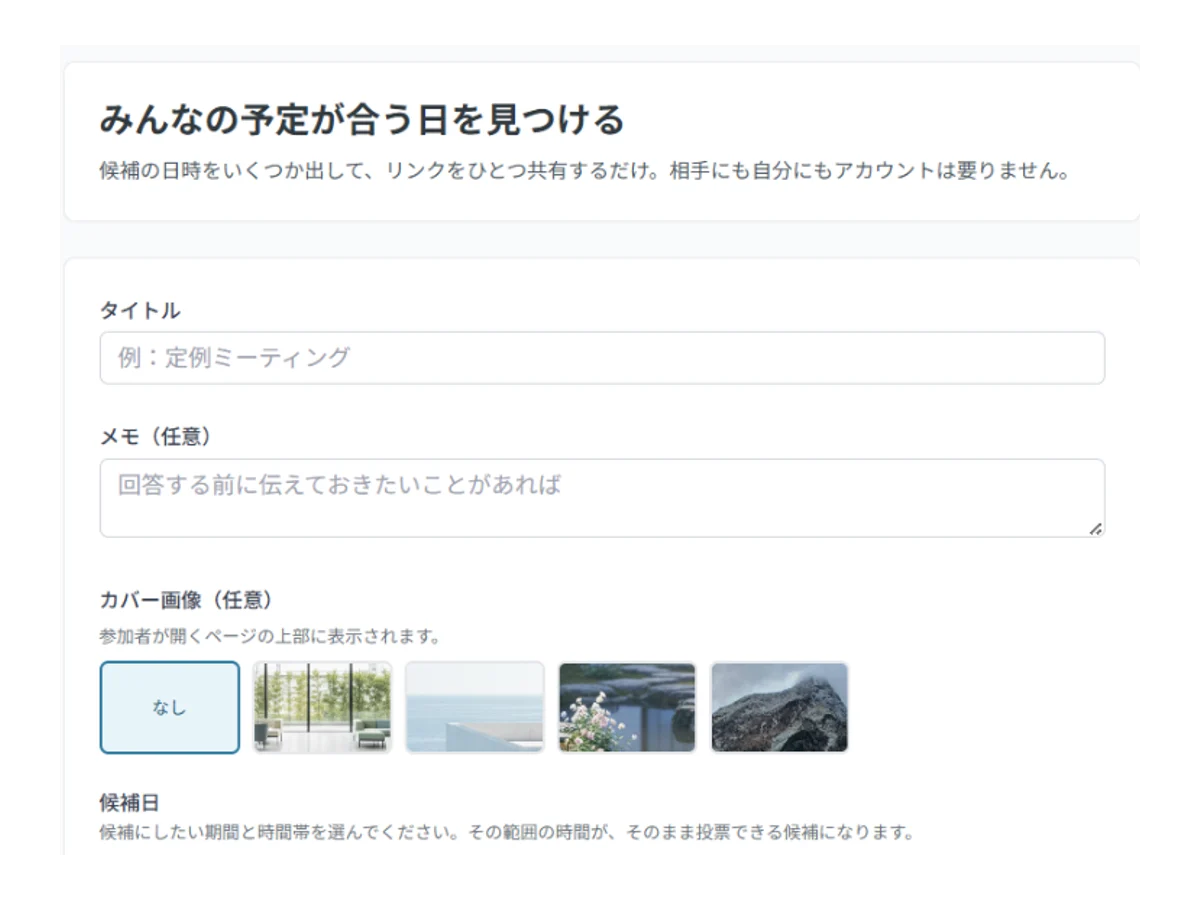
Creating a scheduling poll: pick a date range, a working window and the weekdays
1 STEP 01

Set the candidate times

Choose a span of dates, a working window and which weekdays to include. The individual time slots are built from that — you never type them one by one. Up to 120 slots.

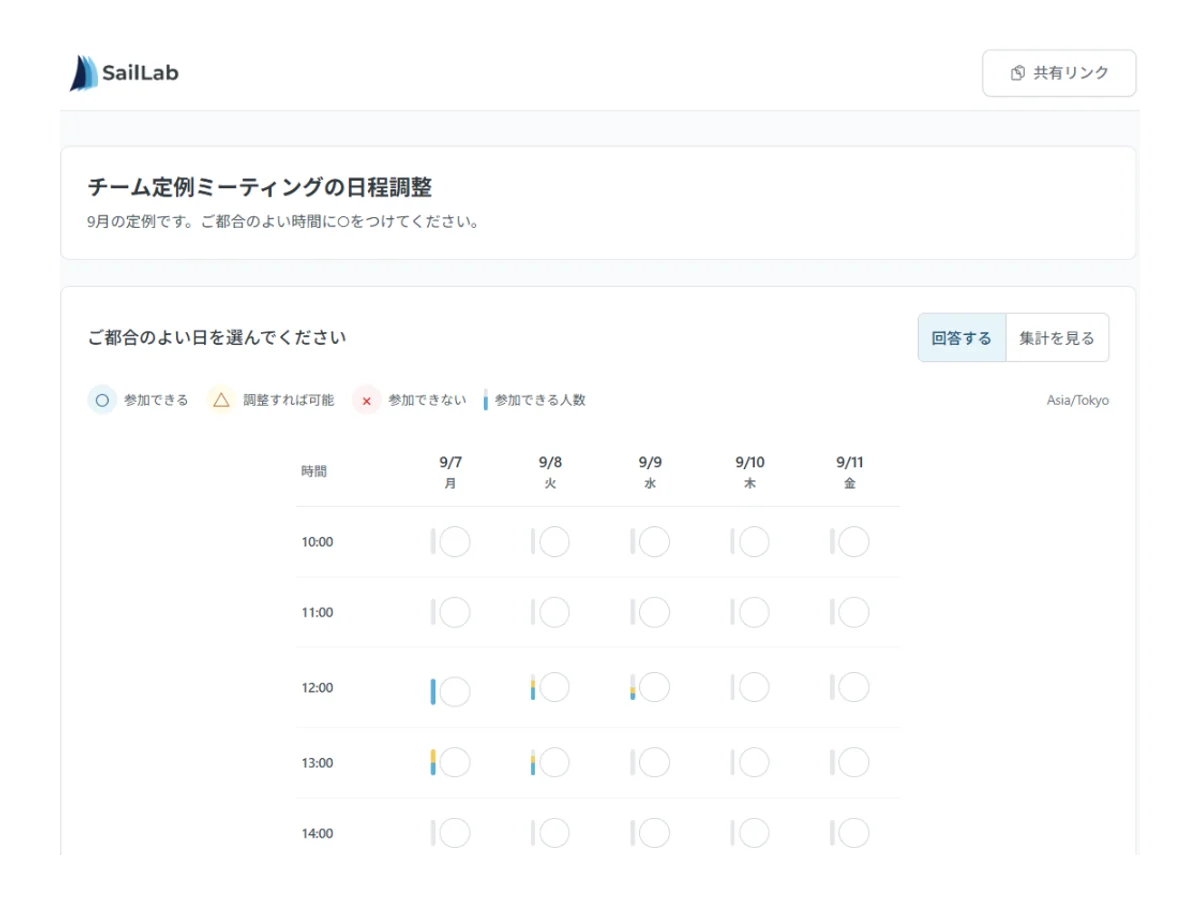
The shared link as a participant sees it: candidate times in a grid, answerable with no account
2 STEP 02

Share the link

Paste the link into email or chat. Whoever opens it can answer straight away, with no account and no sign-up.

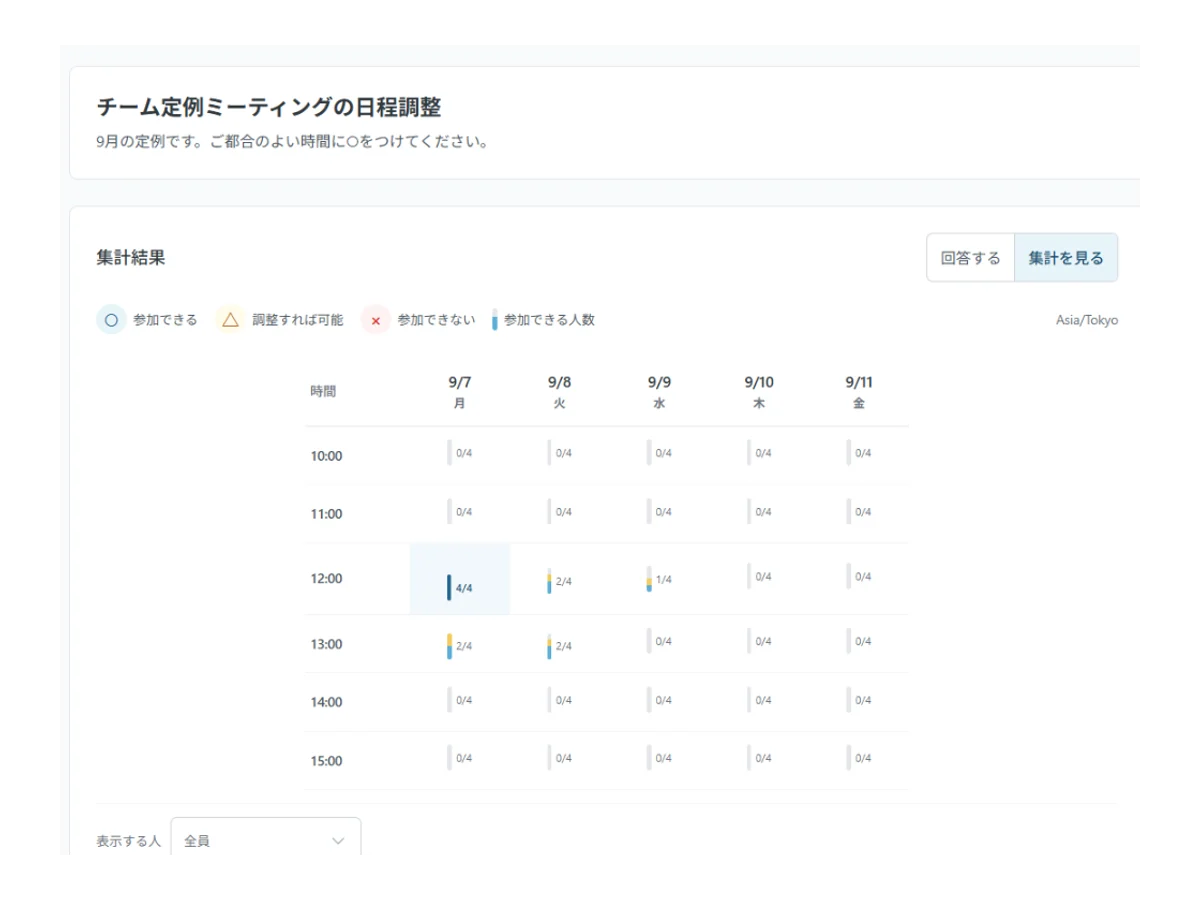
The results: a count per candidate time, with the best-attended one highlighted
3 STEP 03

Read the answers and decide

Every answer lands in one grid, and the times most people can make stand out by shading. Nothing to tally by hand.

What the tool does

No account to answer

People open the link, mark the times that work, and give a name. No app, and no address unless you ask for one.

○ / △ / × — or just ○ / ×

Three answers when "I could if needed" is worth knowing, two when you want a straight yes or no. People can change their own answer later.

Candidate times by range

A date span, a working window and the weekdays — a week of hour-long slots takes about half a minute to propose.

What a scheduling poll is for

Asking people one at a time when they are free means that by the time the last reply arrives, the first person's calendar has moved on. A scheduling poll removes the round trip: you propose the candidate times, everyone answers on the same screen, and you read the overlap.

Where people use it

  • Meetings with people outside your company — you cannot see their calendar, so proposing times and letting them choose is the shortest path.
  • Interviews and panel meetings — with several interviewers you are looking for the overlap, and the grid shows it.
  • Parents' meetings, PTA, lessons — one link reaches people whose contact details you do not all have.
  • Welcome parties, team dinners, drinks — whoever is organising collects everyone's availability without asking anyone to register.
  • Clubs and reunions — the less recently you have spoken to someone, the less likely they are to install anything.

Poll or booking page?

They look similar and suit different jobs.

  • A poll (this tool) — when several people have to be in the room and you need the overlap. Meetings, panel interviews, team catch-ups.
  • A booking page — when one person should pick from the time you already have free. Consultations, trial lessons, sales calls.

What the free version does, and does not, do

Without an account: create candidate times, share the link, collect answers from up to 5 people, and read the results. The poll is kept for a year.

How the plans differ is set out on the pricing page. With an account you also get email invitations with a personal link each (so you can see who has not answered), bookings created for everyone who answered ○ once you settle the date, and no expiry. The respondent limit rises to 10 on the free plan, and there is no limit at all on any paid plan.

A poll made without an account can be moved into one later. The link does not change, so anything you already shared keeps working and every answer comes with it.

Three things that get answers back faster

Offer fewer times. Dozens of candidates is not generosity — it is work. Propose a realistic few days first and widen only if nothing lands.

Say when you need the answer. A request with no date attached gets postponed.

Fill in your own row first. Otherwise nobody can tell which of your candidates you are actually free for.

Frequently asked questions

Is it really free? Do I need an account?
Yes, and no account is needed to create one or to answer. Without an account, up to 5 people can answer and the poll is kept for a year. A free account raises that to 10 and removes the expiry.
Do the people answering need an account?
No. They open the link, mark the times that work and give a name. No app to install, and no email address unless you switch that on.
How many people can answer?
5 without an account, 10 on the free plan, and no limit at all on any paid plan. Reaching the limit never removes answers you have already collected.
How long is a poll kept?
A year for a poll made without an account, after which it is deleted. Moving it into an account removes the expiry.
How do I get back to the results later?
An organizer link is shown the moment you create the poll — bookmark it or send it to yourself. It is also saved in your browser, but clearing site data loses it.
Can people suggest a time I did not offer?
Yes, if you switch on "let people suggest other times" when you create it. A suggestion becomes a candidate everyone else can answer too.
Once the date is set, can it email people or create the bookings?
Move the poll into an account first. Email invitations and turning the winning slot into bookings both need an account to send from, so they are not available on an account-less poll. Moving it is one button on the results screen, and the link and the answers come with it.
Does it work on a phone?
Yes — creating and answering both work in a phone browser, with nothing to install.

About a minute from here to a shared link

With no account: up to 5 answers, kept for a year. With a free account: 10 answers, email invitations with a personal link each, the winning time turned into bookings, and no expiry. Neither costs anything.