
"MOSH is changing its system, and now there's a monthly fee." That is how one creator selling services on MOSH described it in a public post. If you started using MOSH before 19 April 2026, you are on the transitional CLASSIC plan — and CLASSIC ends on 30 September 2026.
Reading that change as a price rise will lead you to the wrong decision. MOSH's payment fees have not moved since the January 2026 revision, and bookings, payments and customer management are all included in the free FREE plan. What changes is not the price but where the line around "free" is drawn. This article covers what actually happens on 1 October, and then what to look at if bookings and payments are the only parts of MOSH you use. The short version: the thing to compare is not the fee — it is how each tool handles your calendar.
Contents
More for one-person businesses and small teams is collected in the freelancers and small teams resource centre.
CLASSIC ends on 1 October 2026

Creators who were using MOSH before 19 April 2026 sit on the CLASSIC plan. MOSH's own help pages state that "from 1 October 2026 you will be moved automatically to the FREE plan" (source: MOSH, "Plans and pricing", as of August 2026). Do nothing, and FREE is where you land.
The catch is what happens if your number of published services exceeds the FREE plan's limit. MOSH puts it plainly: "services over the FREE plan's limit will be automatically unpublished, oldest first" (source: MOSH, "Frequently asked questions", as of August 2026). The menus you have had listed longest are the first to disappear.
Worth noting: the number that limit refers to is not published. MOSH directs creators to their own admin screen to see their plan and usage. Do not rely on figures quoted in articles or comparison sites — check your own dashboard. There are only two numbers you need: how many services you currently publish, and what FREE allows.
This is not a price increase

"Now there's a monthly fee" is a natural way to read it, but the amount you hand over has not gone up. MOSH's payment fees are 6.5% + ¥99 on card payments through Stripe, 3.0% + ¥99 on bank transfer, and nothing at all on pay-on-the-day (source: MOSH, "MOSH's fees", as of August 2026). Those rates came down in the revision of 15 January 2026 and have not risen since.
And even after the monthly plans arrived, payments, bookings and customer management remain part of the FREE plan. What the paid tiers add is a different set of things: publishing landing pages, workflows, and higher limits on message broadcasts.
So if your use of MOSH is "take a booking, take the money", you can carry on past October on FREE at ¥0 a month. Price is not a reason to move. The reasons, if you have them, are hitting the service-count limit, or finding that the booking mechanics themselves do not fit how you work.
First, work out which parts of MOSH you use

MOSH is not a booking tool. It is a platform for selling services — landing pages, membership sites, message broadcasts, workflows and subscription products, all in one place. That breadth is the product, and booking is one part of it.
So the question starts with an inventory. If any of the following is true, you can stop reading here.
- Bookings arrive through a landing page you built on MOSH
- You run a membership site or online community
- You send message broadcasts to your registered customers
- You sell a subscription (recurring) menu
A booking tool does not replace any of those. If that is you, choosing a paid MOSH plan and staying is the right answer. Whether ¥1,380 or a few thousand yen a month is worth it is a question you can settle by comparing it against the revenue those pages and broadcasts actually produce.
The other pattern is just as common: "the only thing I built on MOSH is the booking page", or "people find me on Instagram or LINE, and MOSH is just the link I point them at". In that case, everything the paid tiers unlock is a part of the product you are not using.
If bookings are the core, look at the calendar

When bookings and payments are all you use, the thing to compare is not the price. It is how your own schedule connects to your bookable slots — and MOSH documents this itself.
On Google Calendar, what MOSH's help page describes is that "guest booking details for schedules of event-type services you host are reflected in Google Calendar" (source: MOSH, "Google Calendar integration", as of August 2026). The direction described is bookings being written out to your calendar.
On time off, MOSH is explicit: "there is no function to automatically mark public holidays or specific dates as unavailable. Booking slots must be deleted manually each time" (source: MOSH, "Setting dates and schedules", as of August 2026).
In day-to-day terms, that means this. A school event, a medical appointment, a meeting for other work — every time something lands in your day, you go into MOSH and remove the slot yourself. Miss one, and someone books it, and you are apologising and rearranging.
- How many times a week do you delete booking slots by hand?
- How often in the last three months have you apologised for a double booking?
- How do you close off holidays and long weekends each time they come round?
If the answer to all three is "hardly ever", MOSH's FREE plan will not cause you trouble. If you are deleting slots several times a week, the October switch is a useful prompt to revisit the mechanics.
The booking-specific option
If you are moving only bookings and payments elsewhere, there is not much to check.
- Can it read your existing calendar (Google or Outlook) and drop those times from your open slots automatically?
- Can holidays and one-off closures be handled without deleting slots by hand?
- Can you take payment at the time of booking, with a choice of how?
- Are confirmation and reminder emails sent automatically?
Compare cost by adding the monthly fee and the payment fee together. A ¥0 monthly plan still takes a cut of each transaction, and some services lower the rate once you pay monthly. Looking at only one of the two is not a comparison.
Below, SailLab is offered as one example of a tool that meets those four points.
SailLab
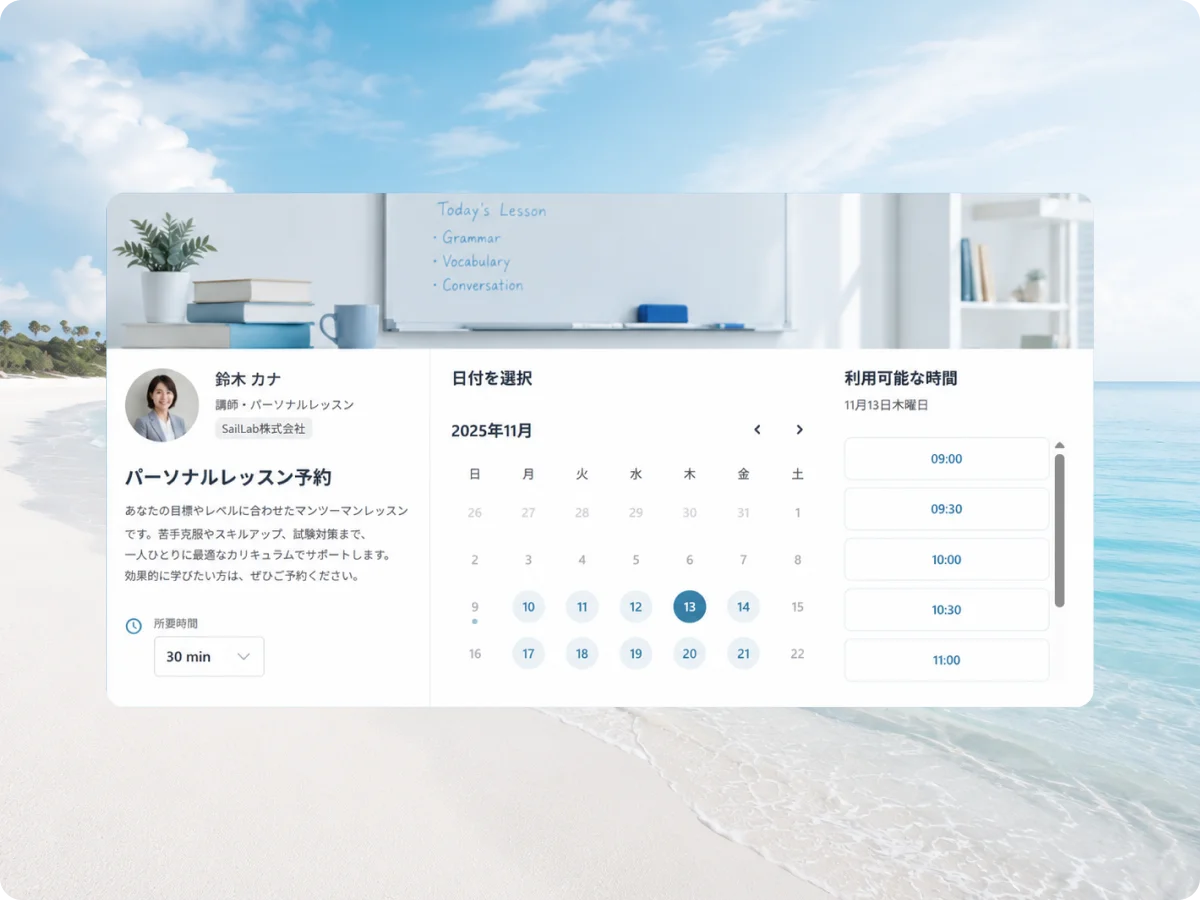
SailLab is a Japan-built booking system that brings booking intake, calendar sync and upfront payment together in one place.
- Works with Google Calendar and Outlook, and removes busy times across multiple calendars from your open slots automatically. You choose which calendars count towards the check
- Syncs a per-country public holiday calendar so holidays close themselves
- Duration and price are set per service, with payment either at the time of booking or invoiced afterwards
- Confirmation and reminder emails are automatic, and guests can reschedule or cancel themselves
- Booking pages work in Japanese and English
A common split is to put upfront payment on the first-consultation page to cut no-shows, and run the returning-client page without payment so it only holds the time.
| Plan | Monthly (ex-tax) | Relevant to this article |
|---|---|---|
| Free | ¥0 | Calendar sync, confirmation and reminder emails. One booking page |
| Light | ¥1,000 | Unlimited booking pages, custom URL, logo and brand colours |
| Standard | ¥1,500 | Adds upfront payment (SailLab commission 3%) |
| Professional | ¥2,800 | Same features as Standard, with SailLab's commission at 0% |
Prices are as of August 2026. If you take payments, Stripe's own processing fee (3.6%) applies on every plan, separately from SailLab's commission. Calendar sync and reminders alone fit inside the Free plan; upfront payment means Standard or above. Full detail is on the pricing page.
It suits people losing time each week to slot management, or maintaining their schedule twice — once in a calendar and once in a booking page. If instead you want landing pages, a membership site and broadcasts in one place, the third section above applies and staying on MOSH is the answer.
What to do before 30 September

The end of CLASSIC is a redrawn line, not a price rise. Worked through in order, there is nothing here to rush.
- In your admin screen, check how many services you publish and what FREE allows. Under the limit, and October changes nothing — you continue at ¥0
- Over the limit, look at which menus would be unpublished oldest-first. If they are menus you no longer use, tidying them yourself removes the problem
- Check whether you use landing pages, a membership site, broadcasts or subscriptions. If you do, pick a paid plan — the decision ends here
- Only if you do not, revisit the booking mechanics. How often you delete slots by hand is the number that decides it
- If you move, run both in parallel through September. Take new bookings on the new page and let existing MOSH bookings play out where they are, and nothing falls through
On taking payment at the time of booking, see the article on prepaid booking systems; on accepting one-off lessons and sessions directly, see the article on single-session lesson bookings. Booking for one-person businesses more broadly is covered on the page for freelancers.
SailLab is free to try (no credit card required).
Saori Okada / SailLab Editorial
Writes for SailLab Editorial on setting up booking and scheduling for one-person businesses and small teams.
Automate your booking flow with SailLab
Calendar sync, automatic reminders, and prepaid bookings — all in one booking page. The Free plan takes 3 minutes to set up, no credit card required.